Designing gen AI tools for enterprise business users
BeeAI
IBM, 2024
TL;DR
As the lead UX researcher, I guided BeeAI from an early concept to a celebrated gen AI product launch in just nine months. By centering enterprise business users in my studies, I reshaped the product’s design and strategy to meet the realities of how these users adopt AI in the workplace. My research revealed how to help them shift from AI habits shaped by personal use to efficient AI collaboration in the office by sparking adoption through clear examples, building trust with progressive verification, and designing for new methods of human-AI co-creation. Today, BeeAI is IBM’s second most-starred open-source project on GitHub, has been recognized by Fast Company, and has been adopted by the Linux Foundation.
Case Study
6 min read
Centering enterprise business users from concept through launch
If you spend most of your workday on a laptop at a large organization and you don’t code, you’re probably an “enterprise business user”, one of the groups poised to benefit most from generative AI adoption in the workplace. Enterprise business users were a core user group during the nine months I lead UX research for BeeAI, an open-source agent framework and platform for discovering, running, and composing AI agents. My UX research guided the BeeAI team from concept to product launch to maintenance. My team relied on evidence-based insights to inform how we served enterprise business users through several product iterations. Here, I'll share the insights I uncovered as well as the process I used.
Illustrate the possibilities of gen AI in the office
I uncovered this insight while leading UX research for BeeAI. It was November 2024, and my team was on the cusp of launching BeeAI App Builder, an LLM-powered tool enabling enterprise business users to create reusable, AI-powered apps with dynamic GUIs using natural language in a chat-to-build interface. Remember that this was early in the days of AI agents (in fact, it was the same month that Lovable launched) so most enterprise business users had never heard of an AI-powered app builder before.
Video illustrating the BeeAI App Builder interface in use.
My development team had just built the first working version of the BeeAI App Builder, so I immediately kicked off a study to get the tool into the hands of enterprise business users to see how they would interact with this new technology. I recruited five participants from within IBM who were enterprise business users to participate in 30-minute semi-structured interviews blending contextual inquiry and usability testing.
Before giving participants access to BeeAI App Builder, I asked them to list the work tasks that they'd like to automate with AI. Initially, their ideas about how AI to help them were generic and low impact, primarily involving generating text for personal communication. I then shared examples of apps my team had created using BeeAI app builder illustrating how personalized apps could address repeated work, custom workflows, and outputs beyond simple text generation. These example apps included a PowerPoint presentation evaluator, a product feedback analyzer, a GitHub issue writer, and a receipt-to-expense-report-generator.
After seeing these examples, participants identified far more complex, personalized, and high value workflows that addressed problems that they regularly faced. They identified multi-step workflows that reflected the high levels of customization in their current processes often involving enterprise systems. They began thinking of tasks like “Review this user feedback, identify the top pain points, and draft a GitHub ticket documenting those issues using my team's template”. Once they understood the possibilities for gen AI in the workplace, they displayed a hunger and facility for envisioning personalized impactful use cases.
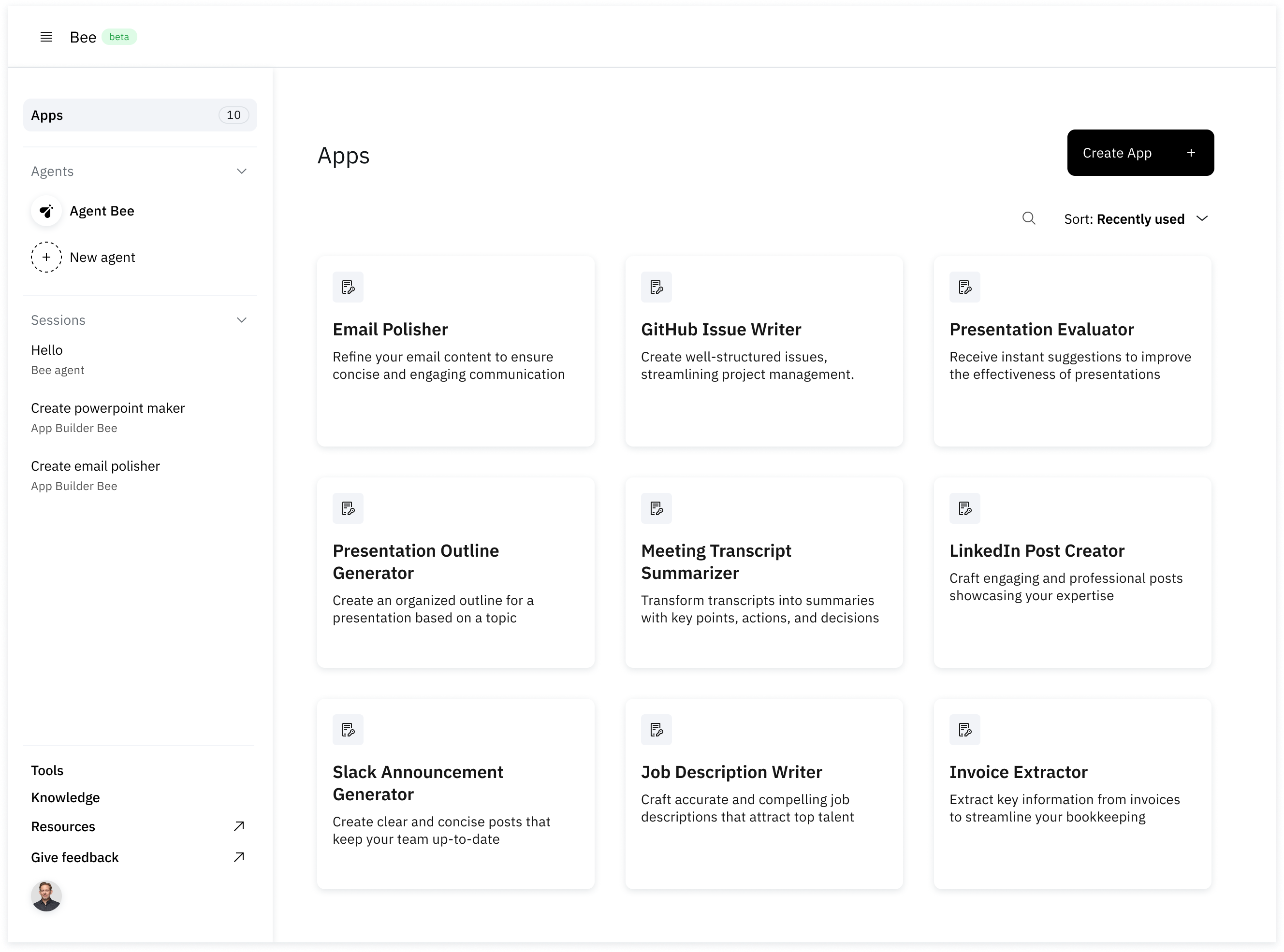
This insight prompted my team to build a library of example apps in the BeeAI App Builder interface so that we could re-create this "aha-moment" for all users. When we launched a few weeks later, the library showcased 14 example apps highlighting repeatable and personalized use cases.
BeeAI's app library populated with example apps.
Provide multiple ways to verify output
Business users often learn how much to trust gen AI's outputs based on their experiences using it at home. They know that sometimes AI hallucinates without expressing uncertainty and also that sometimes it completes tasks with astounding accuracy. In personal use cases, users can usually spot the difference between these two scenarios. When AI tells us to use glue as a pizza topping, we know that we can't trust that output.
However, in an enterprise use case the tasks get more complex, users become less familiar with the data the system is referencing, and it becomes more difficult to determine whether the response is accurate. Deciding when to trust AI-generated output and when to invest time in verification is nuanced and context-specific in the workplace. The methods enterprise business users use at home to determine the trustworthiness of AI outputs don't always serve them at work. Gen AI tools for enterprise business users need to help them learn when and how to trust generated outputs.
This insight emerged while developing BeeAI's chat interface. BeeAI is an umbrella for a family of products utilizing interrelated agentic AI systems. One of these sub-products is Agent Stack, an infrastructure for deploying and sharing AI agents via a chat-based graphic user interface (GUI). This chat interface can be applied to any AI agent, so we needed to create a design that provided flexibility for a wide range of use cases encompassing different levels of risk and trust.
We ran a study to understand how enterprise business users determined the level of trust (and therefore the need for verification) in our chat interface. We identified 24 participants from the general IBM population who did not have generative AI development experience. We conducted semi-structured interviews where they interacted with a working prototype of the chat interface connected to a live agent. Users were asked to judge their confidence in the accuracy of outputs. Keep in mind that in July 2024 when this study was launched, ChatGPT did not have sources or citations shown in the interface.
We found that the more risk participants associated with a use case, the more they wanted to verify the accuracy of the response. However, many participants became overwhelmed if they saw all of the ways to verify outputs simultaneously. Participants perceived higher risk in work-related use cases than personal use cases and relied on a wide variety of indicators to judge the accuracy of the outputs including the AI system's plan and sources.
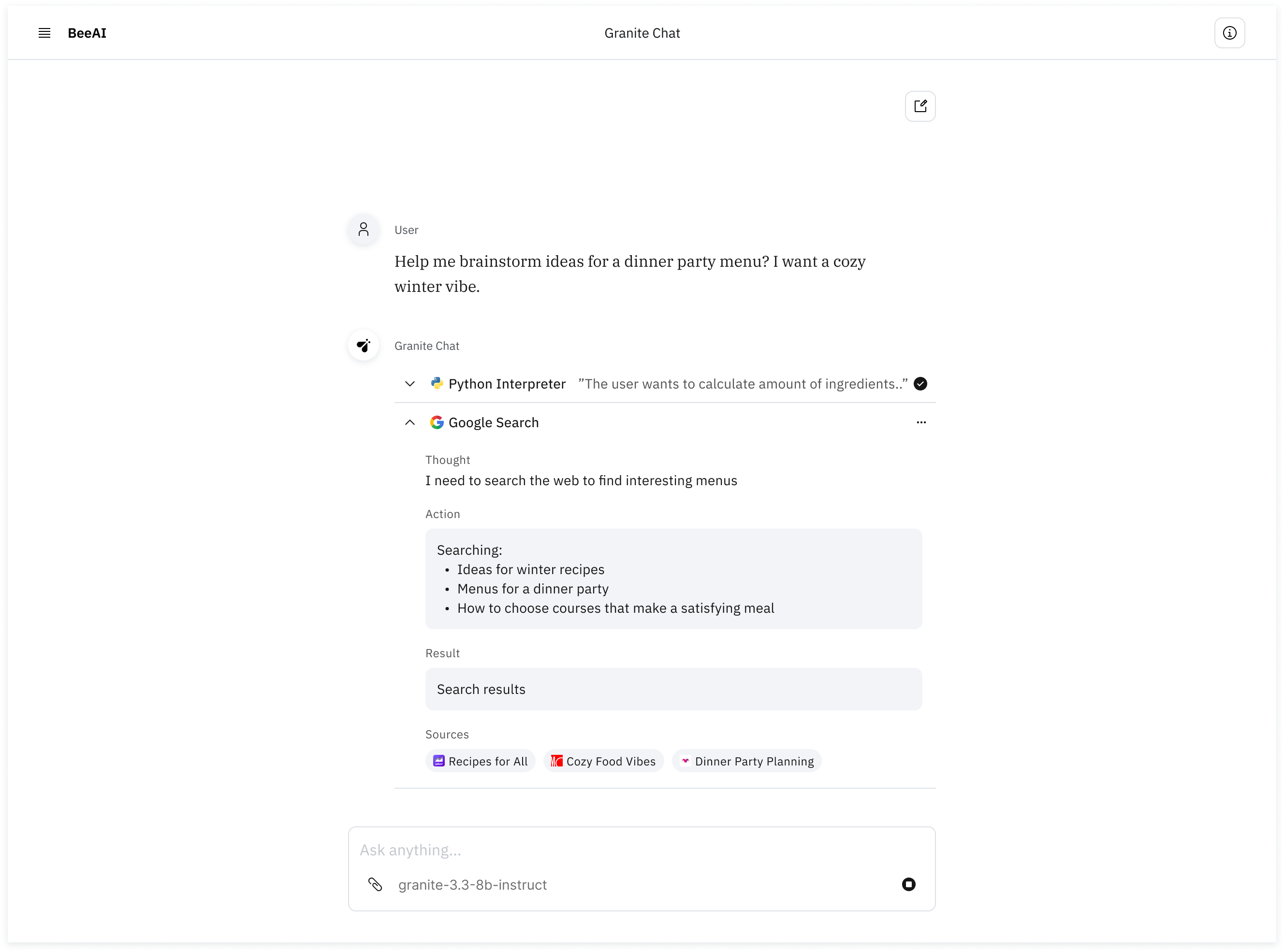
BeeAI interface in the process of generating a response with the plan toggled open.
These insights led our team to design a 2-part user verification workflow: a response generation plan and sources panel. While the user waited for an answer, our UI displayed the agent's plan outlining the steps it would take to gather information and generate output. Users were able to review the plan to confirm that the agent's actions made logical sense before they were presented with any other information.
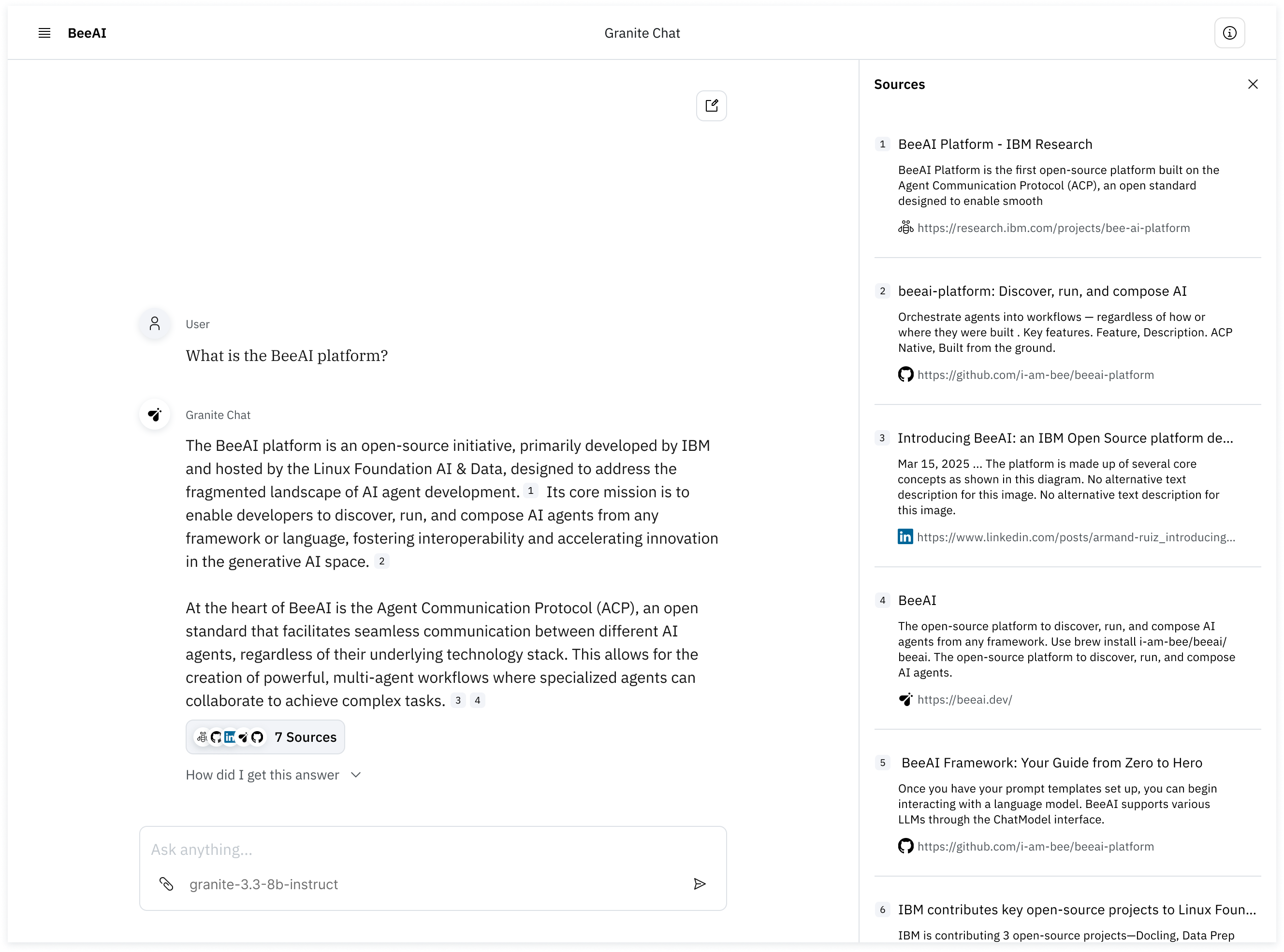
BeeAI interface after a response has been generated with the sources panel toggled open.
Once the AI system generates the output, our interface toggles the plan closed and populates the sources panel instead. The panel is initially closed to reduce cognitive load. The user can use the panel to inspect all the websites an agent visited to obtain information that informed the output.
Reduce friction to enable meaningful collaboration
Once an enterprise business user has identified a use case where gen AI can make impact and has developed an appropriate level of trust, there is still friction in the actual process of collaborating with the AI system to complete the task. This can look like seemingly endless prompt tweaking or going through several iterations only to decide that the output from five minutes ago was better. Gen AI products for enterprise business users must make the actual process of human-machine collaboration easy in order to drive adoption.
In BeeAI, we hypothesized that chat-based interfaces like ChatGPT were limiting human-machine collaboration. To learn whether this was true, we explored long-form document writing as a primary use case. I designed and executed a study using semi-structured interviews and concept testing to identify pain points that enterprise business users experienced while writing long-form documents using commercial gen AI products like Microsoft Copilot. Note that at this time no canvas interfaces for leading gen AI tools existed.
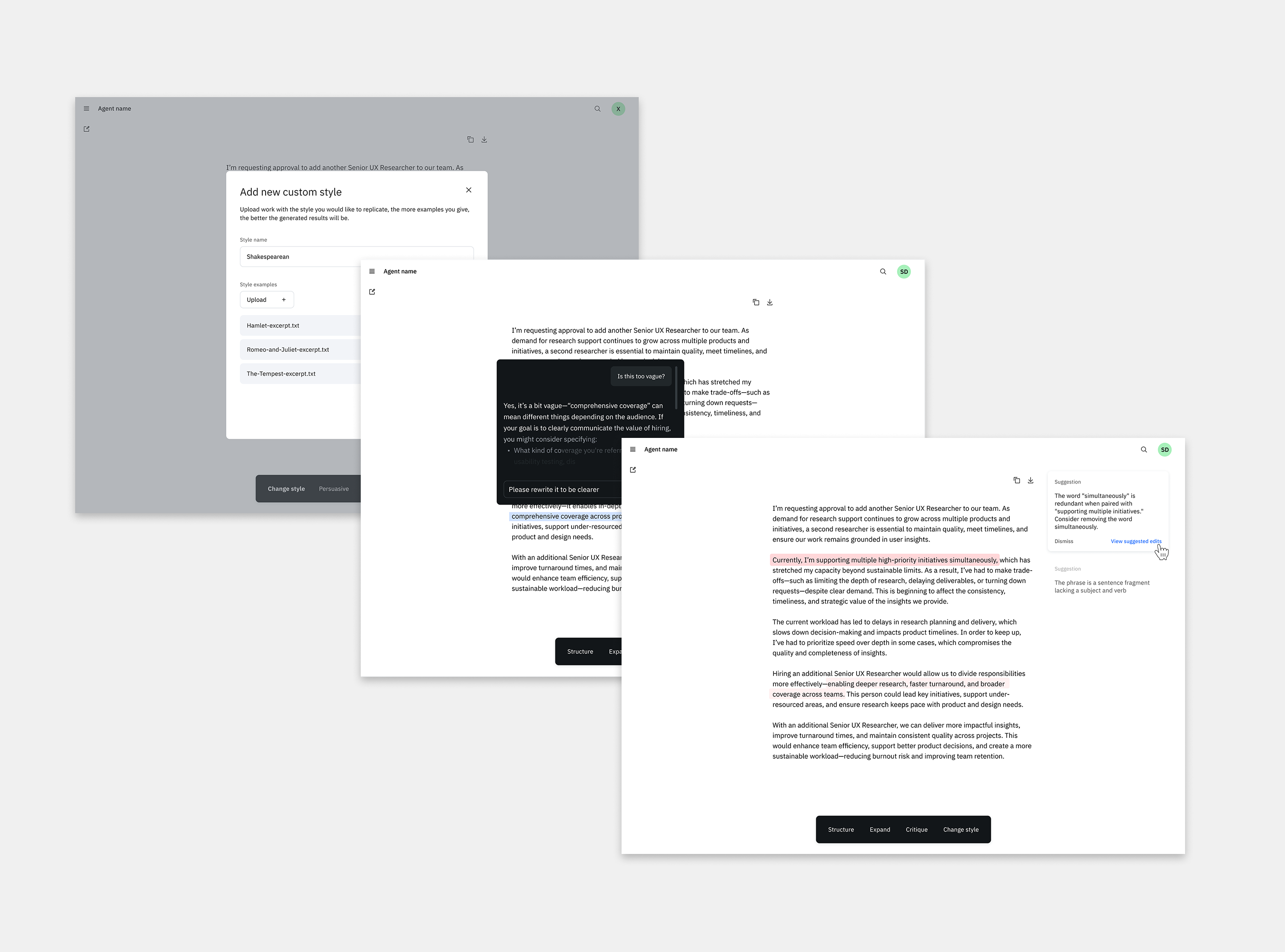
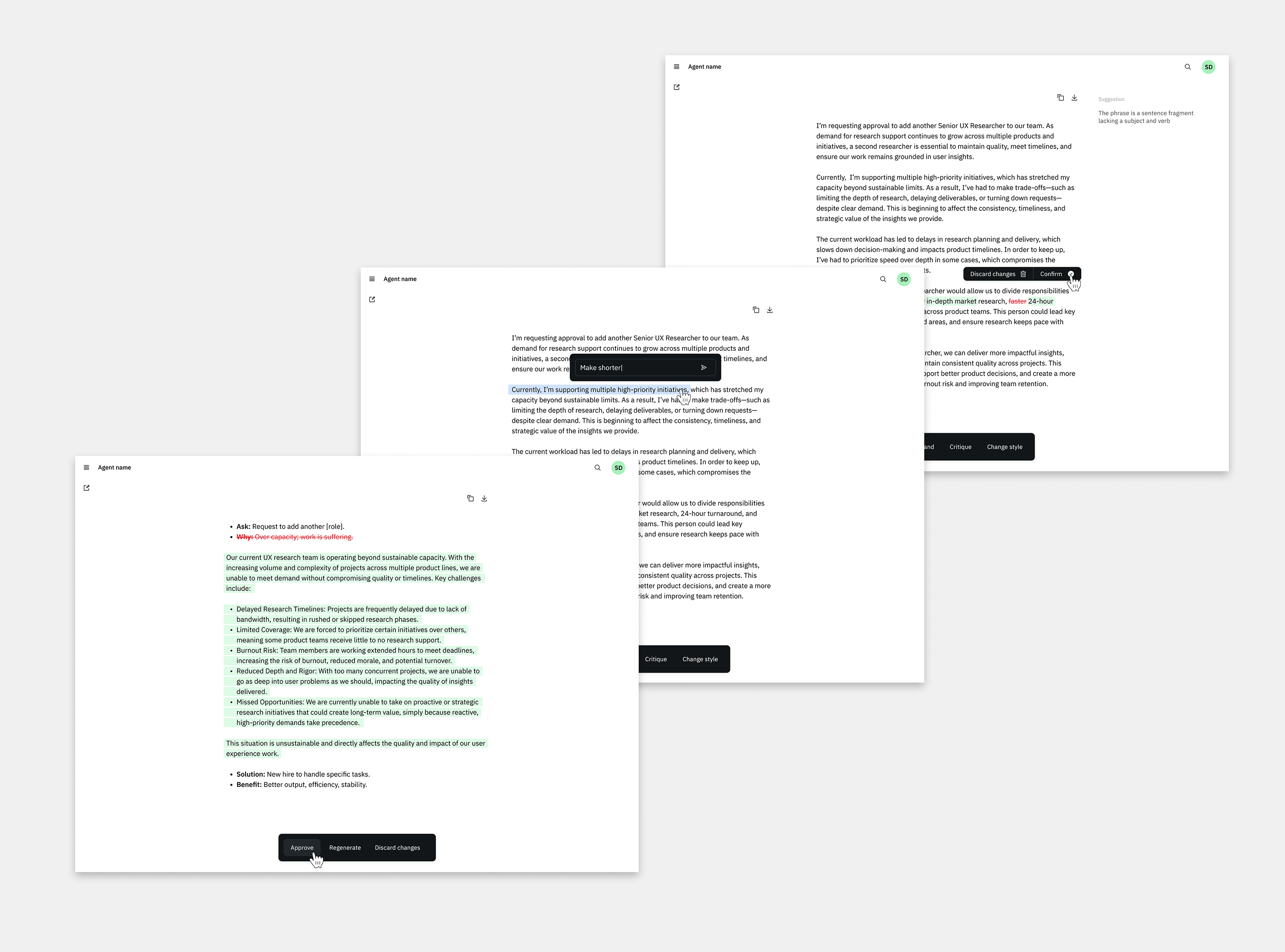
The prototype I tested with a writing-specific interface including functionality to add custom style, ask exploratory questions, and view reasoning for suggested edits.
I recruited 7 internal IBM participants who used generative AI products for writing. During 45-minute interviews, I mapped their AI-assisted writing process, identified challenges, and captured their reactions to several concepts. I identified several friction points that made writing collaboratively with commercial AI systems challenging.
Participants struggled to identify changes the AI system made in the document.
Participants tried to prompt the AI system to make targeted changes to specific areas of the document but were often unsuccessful.
Participants were frustrated when the AI system made changes to areas of the document that they didn't intend.
My team transformed these insights into signature features in a writing-specific canvas interface for BeeAI. These features allowed users to collaborate effectively and seamlessly with the AI system by:
Highlighting and tracking changes the AI system made within the document so that users could quickly find and review changes across iterations.
Allowing users to indicate specific passages that they wanted the AI system to change and write prompts detailing changes for that specific section.
Allowing users to designate areas that would be protected from changes by AI system.
The final interface design incorporating research insights highlighting functionality supporting tracked changes, targeted AI edits, and protecting areas from AI edits.
Serving business users with BeeAI
Across BeeAI's iterations, these insights guided product strategy and design to address the specific needs of enterprise business users. During the nine months during which I led UX research for BeeAI, my insights impacted its many phases as we developed the concept, publicly launched, were honored by Fast Company's Innovation by Design awards, and brought the project under the Linux Foundation securing its open source status forever. Through these iterations, BeeAI has received over 4900 stars, 85000 downloads, 340 forks, and 50 contributors on GitHub making it the second most starred open source IBM project.
Next Project:
Transforming an MVP into a widely adopted and highly usable product